Duel mobile – browser access and what to expect on a small screen
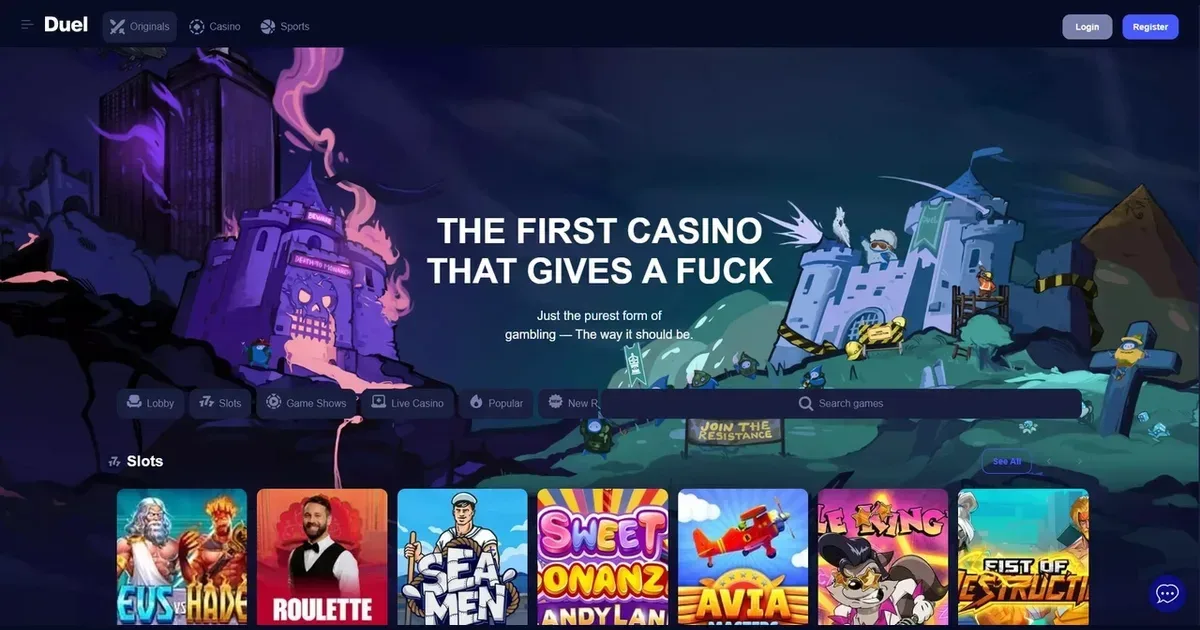
















Before you open Duel on your phone for the first time, three things matter: the connection you're on, whether you've set deposit limits, and that you're reaching the operator's own address. Mobile sessions are easier to start than desktop ones—they're also easier to lose track of.
What to check before playing on mobile
A phone is not a locked room. Start with these steps and the rest follows more safely.
- Set your limits before the session – deposit caps and loss limits work better when they're in place before you open the cashier, not after three spins.
- Confirm the address – type it yourself rather than following a link from a message or a search ad. Phishing sites look identical on a small screen.
- Check your connection – live dealer tables and in-play sports betting need a stable link. Switching between Wi-Fi and mobile data mid-hand can drop you out.
- Sign out on a shared device – a phone left unlocked with an active session is an open cashier to anyone holding it.
- Battery and time – a session that starts at 80% charge and runs to 10% is longer than it feels. Set an alarm if you're prone to losing track.
These aren't warnings for beginners. They're the gaps that catch experienced players when the context changes.
Mobile access at Duel
The operator runs its platform through a mobile browser. You reach it the same way you would on a desktop: type the address into Safari, Chrome or Firefox, log in with the credentials you already have, and the layout adjusts to fit the screen.
There is no requirement to install anything. The account, balance, bonuses and history are the same whether you're on a laptop or a phone—only the interface changes.
Using the mobile site in practice
Once you're logged in, the core functions work as they do on desktop. The lobby shows the same slots, live dealer tables and sportsbook markets. Search and filters are present, though scrolling through hundreds of titles on a 6-inch screen takes longer than scanning a grid on a monitor.
Games launch in portrait or landscape depending on the title. Duel Originals—the operator's 11 proprietary games including Dice, Plinko, Crash and Mines—are built for fast play and load cleanly on mobile. Third-party slots and live tables depend on their provider's own mobile build; most modern releases work without issue, but older titles may load with cramped controls or text too small to read comfortably.
The cashier is accessible from the menu. Deposit and withdrawal options mirror the desktop list, though entering card details or wallet addresses on a phone keyboard is slower and more error-prone. Double-check every character before submitting.
Sports betting occupies a significant part of the platform. The operator covers 31 traditional sports and 25 esports titles, with features including Cash Out, Bet Builder and in-play markets. On a phone, building a multi-leg bet or scanning live odds across several matches means more tapping and scrolling than it would on a large screen, but the tools are all present.
Support runs through email at [email protected]. There is no live chat widget listed, so raising an issue from mobile means switching to your mail app, writing the message there, and waiting for a reply—less immediate than a chat window, but workable if you've saved account details and screenshots of the problem.
What mobile play actually includes
You can register, verify, deposit, play and withdraw entirely from a phone. The operator's responsible gambling tools—self-exclusion locks for a minimum of six months, and a seven-day cooling-off period—are accessible through the account settings.
The platform's leaderboards, which run $2 million in monthly prizes and $25,000 daily across slots and live games, are visible and your play contributes to them whether you're on mobile or desktop. The Comboboost feature for accumulator bets applies on mobile just as it does elsewhere, scaling your returns based on the number of selections from 1.01× for two picks up to 2× for twenty.
Verification documents can be uploaded from your phone's camera roll. The operator asks for identity confirmation under its KYC policy, though the exact trigger point is not published—it may be before a first withdrawal, above a certain amount, or at account opening depending on your jurisdiction.
Where the small screen costs you
Some tasks are simply harder on a phone, and pretending otherwise wastes your time.
Reading terms is the first casualty. Bonus wagering rules, withdrawal caps and game exclusions are written in full paragraphs, not bullet points. On a desktop you can scan them in one pass; on a phone you scroll, lose your place, scroll back, and miss the clause that matters. If a bonus has conditions, read them on a larger screen before you claim it.
Comparing odds across live markets or several bookmakers is practical on desktop, tedious on mobile. By the time you've opened three browser tabs and flipped between them, the line you wanted has moved.
Multi-table play does not work. Some desktop players run three or four slots or poker tables at once; on a phone you're limited to one game at a time, which slows session volume and reduces your ability to spread risk.
Account history and statements are harder to review on a small screen. Scrolling through a month of transactions to check a missing deposit or confirm a withdrawal timing is possible, but not comfortable.
Data and battery are finite. A live dealer session or an afternoon of in-play betting on mobile data can burn through your allowance faster than you expect, and video streaming drains a battery. Losing connection mid-game on a phone usually means the last bet stands and the result settles when you reconnect—but "usually" is not "always," and disputes are harder to resolve when you have no screenshot.
Responsible play on a device you carry everywhere
A phone makes access frictionless, which is the problem. You can open the platform from a bus, a pub, a queue, or bed at 2 a.m.—contexts where you would never sit down at a desktop and log in deliberately.
Set deposit limits through your account before your first mobile session, and make sure self-exclusion and cooling-off tools are visible in the menu so you know where they are if you need them. The operator locks self-exclusion for a minimum of six months and stops promotional material; the seven-day break is shorter but still requires you to contact support to reactivate.
If you share a device with anyone under 18, consider device-level parental controls such as Net Nanny or Qustodio, and do not leave the account logged in. The platform is restricted to players aged 18+, but a logged-in session on an unlocked phone is accessible to anyone holding it.
For free, confidential support with gambling, contact GamCare on 0808 8020 133 (24/7) or visit BeGambleAware. Blocking software including Gamban and BetBlocker works across all devices and is free to install.
This site is for players aged 18 and over (18+). If gambling ever stops feeling like entertainment, free and confidential help is available at BeGambleAware.org.
Frequently asked questions
Can I play Duel games on my phone without downloading anything?
Yes. The platform runs through any mobile browser—Safari, Chrome or Firefox. You log in with the same account you use on desktop, and the layout adjusts to fit your screen. No installation is required.
Do the leaderboards and bonuses work the same way on mobile?
Yes. Your play on mobile contributes to the monthly and daily leaderboards, and the Comboboost feature for accumulator bets applies exactly as it does on desktop. The account, balance and bonus terms are identical across devices.
Can I deposit and withdraw from a phone?
Yes. The cashier is accessible from the menu and offers the same payment options as the desktop site. Entering card details or wallet addresses on a phone keyboard takes longer, so check every character before submitting.
What happens if my connection drops during a live game on mobile?
The last bet usually stands, and the result settles when you reconnect. However, disputes are harder to resolve without a screenshot, so play on a stable connection where possible and avoid switching between Wi-Fi and mobile data mid-session.
Game Providers